
FansCreator · AI content generation
NSFW AI Video Generator by FansCreator
TL;DR
- The FansCreator NSFW AI video generator animates a photo you already approved into a short clip with the same face, body and setting.
- Plans cost $29, $99 or $299 a month for 300, 1,500 or 5,000 credits, and a 10-second 720p clip costs about 46 credits.
- Skip it if you want long-form video, or if you plan to post a wholly AI-generated persona on OnlyFans, which OnlyFans does not allow.
- Price
- FansCreator plans: $29, $99 or $299/mo
- Product
- FansCreator
- Platforms
- Browser app; downloads sized for OnlyFans, Fanvue, MYM, Instagram, TikTok and X
- Free trial
- FansCreator advertises a free plan with no card required
What the NSFW AI video generator is
The FansCreator NSFW AI video generator turns a photo into a short video clip for adult creator platforms. You pick a photo of yourself or of an original AI persona, describe the motion, and the model adds movement while keeping the same face, body, outfit and room. It is part of FansCreator, the AI content studio from the Fans API team.
It exists because mainstream video tools such as Kling and Veo refuse adult prompts at the source, and no setting changes that. FansCreator runs video models from the Wan and Seedance families without a mainstream content filter, so prompts for adult content render instead of failing. It sits in our AI tools for OnlyFans category, next to the image tools that usually produce its starting photos.
Key features of the NSFW AI video generator
The tool covers one job, getting from an approved photo to a clip that is ready to post, and each feature below targets a common problem creators have with AI video.
Image to video from your own photos
Most clips start from a still you already approved, often one made with the NSFW AI image generator. Because the likeness is fixed in the photo, the clip doesn’t invent a new face, and text-to-video is still available when you want to prompt a scene from scratch.
One persona across photos and clips
Clips and photo sets share the same persona, so subscribers see the same person in Tuesday’s set and Wednesday’s clip. The persona itself is built with the AI OnlyFans model tool, from traits you choose or from your own handle.
Motion-only prompts
A video prompt only needs to say what moves, because the photo already shows who and where. FansCreator suggests four parts: one action, a camera move such as a slow push-in, a pace, and what should stay the same. One clear action per clip gives the most reliable results.
Platform formats and captions
Downloads come sized for OnlyFans, Instagram, TikTok and X, with an optional AI caption. That lets you cut a safe-for-work teaser for social media from the same clip you sell to subscribers.
Screenshot
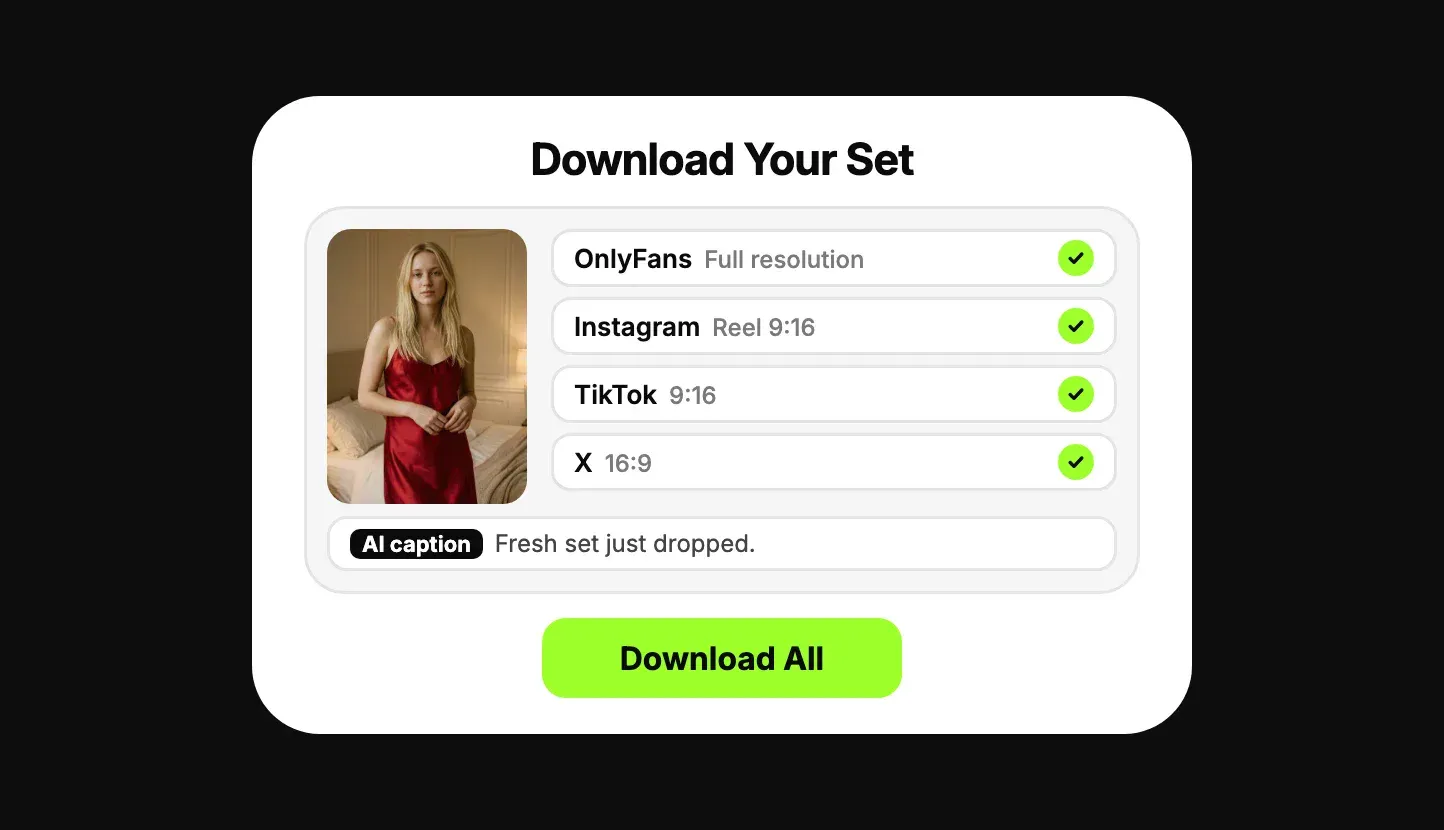
This illustration comes from the FansCreator product page and shows the final step. One approved image is exported in four platform formats with an AI caption, and Download All saves every version at once.
Is the NSFW AI video generator safe to use?
FansCreator never posts for you, because every clip is downloaded and uploaded by you, so nothing reaches your OnlyFans or Fanvue account without your approval. The tool also keeps two hard rules: it blocks the face or likeness of any real person who hasn’t consented, and it blocks anyone underage or made to appear so.
Platform rules matter as much as the tool. OnlyFans allows AI content only when it clearly features you, the verified creator, labelled #ai or #AIGenerated. Wholly AI-generated accounts belong on Fanvue or MYM, while Fansly bans photorealistic AI content even when it is labelled. FansCreator quotes the clauses on its OnlyFans AI content policy page. We know of no independent security audit of FansCreator.
Pricing
FansCreator has three self-serve plans: Starter at $29 a month for 300 credits, Basic at $99 for 1,500 credits and Pro at $299 for 5,000 credits. Enterprise is priced on request. Yearly billing costs ten times the monthly price, and one-off top-ups start at $29 for 250 credits. See FansCreator pricing for the current table.
Video is priced per second of output, rounded up to a whole credit per clip. The table below uses the per-second rates FansCreator publishes, as of November 2026, for a 10-second clip. The app shows the exact price before every generation.
| 10-second clip | Credits per clip | Starter (300) | Basic (1,500) | Pro (5,000) |
|---|---|---|---|---|
| Wan, 480p (2.3 per second) | 23 | 13 clips | 65 clips | 217 clips |
| Seedance, 720p (3.2 per second) | 32 | low-res only | 46 clips | 156 clips |
| Wan, 720p (4.55 per second) | 46 | low-res only | 32 clips | 108 clips |
| Wan, 1080p (9 per second) | 90 | low-res only | 16 clips | 55 clips |
Here is what that means for one creator. On Basic, 32 clips at 720p work out to about $3.09 each, enough for one new clip a day with a couple of retries left over. On Pro, 108 clips cost about $2.77 each, which covers several creators. Every retry spends credits again, so plan for some waste. Starter suits testing rather than paid content, since its video output is low resolution only and we assume its 480p clips fall in that tier.
Who it’s for, and who should skip it
The NSFW AI video generator is for creators and agencies that already make photo sets and want more short clips without another shoot. It suits feed clips between sets, paid message clips, quick custom requests and safe-for-work teasers. Agencies with several creators get the most from Basic or Pro, which allow 5 and unlimited creators.
Skip it if you need long-form video, because it makes short clips only. Skip it if you plan to run an original AI persona on OnlyFans, since OnlyFans removes wholly AI-generated content. And if you want to replace the face in footage you already filmed, our AI video face swap page covers the better tool for that.
Pros and cons
Pros
- Runs video models without a mainstream content filter, so adult prompts render instead of being refused
- Image-to-video keeps the likeness from your photo sets, so clips match the feed
- Credit cost per clip is shown before you confirm each generation
- Renders in the browser, so you need no GPU and no local install
- Never posts for you, and blocks real people without consent and anyone underage
Cons
- The $29 Starter plan generates video in low resolution only and has no full-resolution downloads
- Clips of a wholly AI-generated persona are not allowed on OnlyFans, only on platforms such as Fanvue and MYM
- Monthly credits don't roll over, and every retry of a clip spends credits again
- It makes short clips, not long-form video, so it supplements filming rather than replacing it
Frequently Asked Questions
Short answers to the questions agencies ask most.
What is an NSFW AI video generator?
It is an AI tool that turns a photo or a text prompt into a short video without the content filter that mainstream video tools apply to adult material. The FansCreator version starts from a photo you already approved and adds motion, so the face, body and setting stay the same as in the still. Adult creators use it to make feed clips, paid message content and safe-for-work teasers from one photo library.
How many videos do FansCreator credits buy?
It depends on the model, the resolution and the length. FansCreator prices video per second of output. A 10-second clip at 720p on its Wan model costs about 46 credits, so the 1,500 credits on the $99 Basic plan cover about 32 clips. Seedance at 720p costs about 3.2 credits a second, which stretches the same plan to roughly 46 clips. The app shows the exact price before you confirm every generation.
Can I post AI-generated clips on OnlyFans?
Only clips of yourself, the verified creator, labelled with #ai or #AIGenerated. OnlyFans does not allow accounts or content that are wholly AI-generated, so clips of an original AI persona belong on Fanvue or MYM, which accept AI creators with a label. Fansly does not allow photorealistic AI content at all. FansCreator quotes the relevant OnlyFans clauses on its own policy page.
Do I need a powerful computer to use it?
No. FansCreator renders every clip on its own servers, so any modern browser works and nothing has to be installed. Running a comparable video model yourself is possible, but FansCreator estimates it needs a graphics card with 16 GB or more of video memory and several minutes per clip, plus the time to set up and maintain the software.
Is there a free plan?
FansCreator advertises a free plan that needs no card, meant for testing your persona and the workflow before you pay. It does not publish the exact free limits on its pricing table. The paid plans start at $29 a month for 300 credits, and video in full resolution starts on the $99 Basic plan.
Can it change the face in a video I already have?
Not this tool. The video generator starts from a still photo. To put your own face or your AI persona's face onto existing footage, FansCreator has a separate video face swap tool, which we cover on our AI video face swap page. Both tools draw on the same credit balance and plans.
Verdict
The FansCreator NSFW AI video generator is a good fit if you already produce photo sets and want short clips of the same person for the feed, paid messages and teasers. Start on Basic at $99 if the clips are meant for paying fans, because Starter is low resolution only. Skip it if you need long videos or plan to run an original AI persona on OnlyFans.
Best for: Short uncensored clips for PPV and teasers