
Fans API · Analytics and tracking
OnlyFans Meta Pixel Tracking for Paid Ads
TL;DR
- Meta ads tracking connects your OnlyFans Meta pixel to what fans actually do, sending subscriptions, purchases and a "fan sent 3+ messages" event to Meta.
- It is part of the Smart Links add-on at $25 a month per team, on top of a Fans API account, so there is no separate charge for the Meta side.
- Skip it if you don't run Meta campaigns, or if your ad account can't send traffic to a landing page or whitelist domain first.
- Price
- Included in the Smart Links add-on ($25/mo per team)
- Product
- Fans API
- Platforms
- OnlyFans and Fanvue; events to the Meta pixel via the Conversions API
- Free trial
- Fans API has a free plan; Smart Links is billed per team
What Meta ads tracking is
Meta ads tracking is the part of Fans API’s Smart Links add-on that feeds OnlyFans conversions back to your Meta pixel. Meta can see who clicks your ad, but not who subscribes or spends once that person reaches OnlyFans. Without that data, campaigns optimize for clicks, and clicks are cheap to get from people who never pay anything.
The tool closes that gap: when a fan who arrived through a tracked link subscribes, buys PPV, tips or starts chatting, Fans API sends the event to your OnlyFans Meta pixel through Meta’s Conversions API. Meta then learns which people become paying fans and goes looking for more people like them. It runs server-side, supports OnlyFans and Fanvue creators, and sits in our OnlyFans analytics category. The links and revenue reports themselves are covered on the Smart Links page.
Key features of OnlyFans Meta pixel tracking
Each feature below addresses the same underlying problem, which is that Meta can’t see what happens on OnlyFans after the click.
Server-side events through the Conversions API
Events are sent from Fans API’s servers to Meta, not by a script running in the fan’s browser. There is no pixel code to install anywhere, and ad blockers or browser privacy settings can’t remove the signal. Fans API describes the tracking as fully server-side, with no JavaScript on the page.
Three conversion events
Your OnlyFans Meta pixel receives the events in this table, and you choose which one each campaign optimizes for.
| Event | When it fires | Typical use |
|---|---|---|
| Subscription | A fan subscribes through your link | Volume campaigns and free trials |
| Purchase | The fan buys PPV or sends a tip | Optimizing for revenue |
| Fan sent 3+ messages | The fan has sent at least three DMs | Finding spenders before they buy |
Fans API recommends the messages event for most campaigns, for a simple reason. A fan who sends three or more messages has usually decided to stay in chat and spend money. This signal arrives earlier and more often than a purchase, so the pixel collects enough data to learn faster.
Lookalike audiences from paying fans
Because the OnlyFans Meta pixel receives real subscribers and buyers, you can build lookalike audiences from your highest-value fans instead of from everyone who clicked.
A safer path from ad to profile
Fans API’s setup sends Meta traffic to a clean landing page or whitelist domain, never straight to OnlyFans. The Smart Link behind that page redirects server-side, so OnlyFans addresses aren’t exposed to Meta’s crawler.
Attribution parameters and cost per link
You can track by campaign, creative, country, UTM, click ID or your own parameters. You can also set an acquisition cost per subscriber or per promotion, which feeds the cohort ARPS and payback reports.
Screenshot
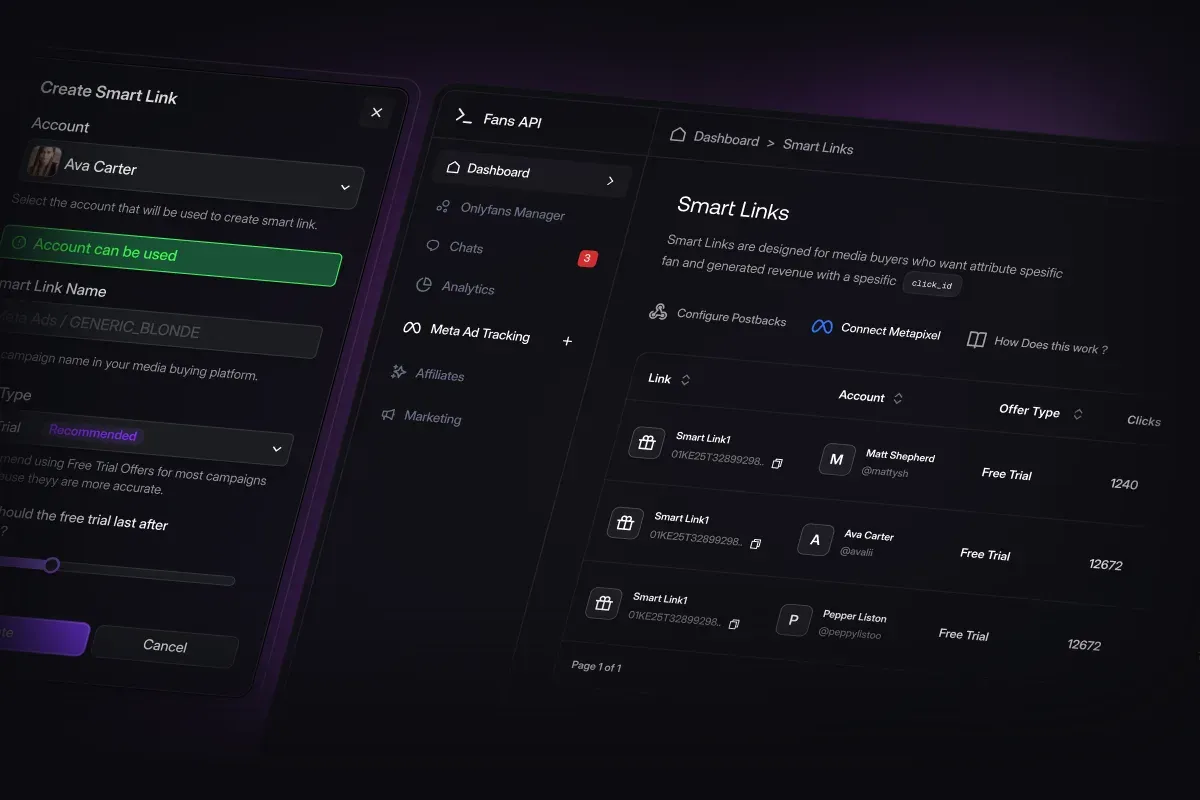
This image from Fans API shows the Meta Ad Tracking section of the dashboard. On the left you create a Smart Link for a creator and name it after your Meta campaign, and on the right the Connect Metapixel button links the account to your pixel.
Is Meta ads tracking safe to use?
Meta ads tracking is designed to keep OnlyFans out of Meta’s view and to leave the creator’s profile untouched. Nothing loads on the OnlyFans page itself. Fans arrive through your landing page, click a tracked link and subscribe normally, while the events travel to Meta from the server.
Fans API’s position is that this setup won’t get your Meta account banned, because Meta’s crawler never sees an OnlyFans address. Treat that as a reduced risk rather than a guarantee, because Meta’s advertising policies still apply to your creatives, your landing page and your targeting. The creator account is connected through Fans API, the same connection its API and other add-ons use. We know of no independent security audit of the feature, so judge it on the setup described here.
Pricing
Meta ads tracking is included in the Smart Links add-on, which costs $25 a month per team. You also need a Fans API account. Fans API has a free plan, paid plans at $69 and $299 a month, and Enterprise pricing on request; see Fans API pricing for the current details. Your monthly advertising budget doesn’t change the price, whether you spend $500 or $50,000.
The worked example below uses invented numbers to show what a better optimization event can mean. Imagine an agency spends $4,000 a month on Meta for one creator, with the campaign optimized for landing page views. It gets 160 subscribers at $25 each, and 40 of them spend money in the first month.
| Example: one creator, one month | Optimized for landing page views | Optimized for 3+ messages |
|---|---|---|
| Ad spend | $4,000 | $4,000 |
| Subscribers | 160 | 150 |
| Cost per subscriber | $25.00 | $26.67 |
| Fans who spent | 40 | 66 |
| Cost per spending fan | $100.00 | $60.61 |
After switching to the messages event, the cost per subscriber rises slightly, but the cost per spending fan falls by about 40%, which a report showing only cost per subscriber would call a worse result. Fans API’s own page claims a 30 to 50% lower cost per subscriber after four to five weeks. Your own figures will depend on the creator, the offer, the creatives and the size of your budget.
Who it’s for, and who should skip it
Meta ads tracking is for agencies and media buyers who run Meta campaigns for OnlyFans or Fanvue creators. It is most useful once campaigns spend enough on Meta to give the OnlyFans Meta pixel dozens of events a week. If you already use Smart Links, turning on the Meta connection is a small extra step, and Fans API puts the whole setup at about 10 minutes.
Skip it if you don’t run Meta ads. If you buy traffic on other networks, Smart Links postbacks may be the part you actually need. If you want someone else to run the campaigns, look at our Meta ads traffic for OnlyFans listing, because Fans API builds the tracking, not the ads. Also skip it if your budget is too small for the pixel to collect enough events.
Pros and cons
Pros
- Meta learns from real subscriptions and purchases instead of link clicks
- A "fan sent 3+ messages" event gives the algorithm an early signal of a fan who will spend
- Events are sent server-side through the Conversions API, so browser blockers don't drop them
- Better source data for lookalike audiences built from your highest-value subscribers
- No extra fee beyond the $25 Smart Links add-on
Cons
- You need a Fans API account plus the Smart Links add-on
- It doesn't make OnlyFans ads compliant; you still need a clean landing page and an ad account that tolerates adult offers
- The pixel needs volume to learn, so small budgets may wait weeks before campaigns improve
- The speed and cost results Fans API publishes come from its own customers and haven't been independently verified
Frequently Asked Questions
Short answers to the questions agencies ask most.
Can you put a Meta pixel on an OnlyFans page?
No. OnlyFans doesn't let creators add a Meta pixel or any other script to their profile, so Meta never sees who subscribed or spent money. Meta ads tracking works around that from the server side. The fan clicks a tracked link, Fans API recognizes the subscription and later purchases, and those events go to your pixel through the Conversions API. Nothing is installed on the OnlyFans page.
Which events does it send to Meta?
Fans API sends three kinds of events. Subscription fires when a fan subscribes through your link. Purchase fires when that fan buys PPV or sends a tip. "Fan sent 3+ messages" fires when the fan has sent at least three chat messages. You can optimize a campaign toward any of them, and Fans API recommends the messages event for most campaigns.
How long until the pixel starts working?
Meta may need two to three days to show new events in Events Manager. Fans API says most agencies see their cost per subscriber fall within two to three weeks, once the pixel has collected about 50 purchase or messages events, with full optimization after four to five weeks. Those are the vendor's figures, so measure your own baseline before you switch.
Do I need a Meta agency ad account?
No. Fans API says the tracking works with personal and business ad accounts. It recommends an agency ad account for adult traffic, because those accounts tend to tolerate this kind of offer better. Either way, send Meta traffic to your own landing page or whitelist domain rather than directly to OnlyFans.
Is this different from Smart Links?
It is the same add-on. Smart Links creates the tracked links and attributes revenue to each ad. Meta ads tracking is the part that sends those conversions back to your Meta pixel. Smart Links can also deliver events to TikTok, Snapchat and trackers such as Keitaro, Everflow and TrafficJunky.
Verdict
Meta ads tracking is worth turning on if your agency already spends on Meta for OnlyFans or Fanvue creators and your campaigns optimize for clicks or landing page views. It gives the algorithm real buyer signals, and it comes with Smart Links at no extra cost. If you don't run Meta campaigns, it has nothing to optimize.
Best for: Feeding real OnlyFans conversions back to the Meta pixel