
Fans API · Analytics and tracking
OnlyFans Tracking Links with Smart Links
TL;DR
- Smart Links is a Fans API add-on that builds OnlyFans tracking links and follows each fan's subscriptions, PPV and tips back to the ad that sent them.
- It costs $25 a month per team on top of a Fans API account, and sends conversion events to Meta, TikTok, Snapchat and tracker postbacks.
- Skip it if you don't buy paid traffic, or if your creators sell on a platform other than OnlyFans or Fanvue.
- Price
- Add-on per team: $25/mo
- Product
- Fans API
- Platforms
- OnlyFans and Fanvue; events to Meta, TikTok, Snapchat and trackers
- Free trial
- Fans API has a free plan; the add-on is billed per team
What Smart Links is
Smart Links is a Fans API add-on that shows which advertisements bring in paying subscribers. You create a separate link for every ad, campaign or traffic source and use it instead of the plain profile address. When a fan clicks and subscribes, the link records where that subscriber originally came from. It then continues adding what the fan spends on PPV, tips and rebills, so you see revenue per source, not just clicks.
It also works in the opposite direction. Advertising platforms like Meta, TikTok and Snapchat can’t see what happens on OnlyFans, so they usually optimize for people who click rather than people who pay. Smart Links sends selected events back to those platforms, such as a new subscription or a fan who sends three messages. It runs server-side, supports OnlyFans and Fanvue creators, and belongs to our OnlyFans analytics category alongside tools for reporting and exports.
Key features of these OnlyFans tracking links
Smart Links covers the complete path from the first click to long-term revenue. Here is what each feature does and why an agency would care about it.
Server-side click and conversion tracking
Clicks and conversions are recorded on the server, not by a script running in the visitor’s browser. Ad blockers and browser privacy settings therefore can’t remove them, which matters because most social traffic arrives on mobile devices. Fans API describes the technical setup in its notes on server-side tracking.
SuperCharged Events
You can define your own conversion, such as a fan reaching $1,000 in total spending, or a fan who sends three or more messages. When a subscriber matches the rule, the event goes to your connected pixel or tracker. This teaches the advertising platform what a valuable fan looks like, instead of treating every new subscription equally. The available options are listed in the conversion events section of the product page.
Events to ad platforms and trackers
Events can go to Meta, TikTok and Snapchat, and to tracker postbacks such as Keitaro and Everflow. You choose which events each destination receives. Configuring the Meta pixel in detail is a separate topic, covered on our Meta ads tracking page.
Ad spend import and True ROAS
Connect your advertising accounts and Smart Links automatically imports what you spent. It places that spending next to the revenue it attributed, so True ROAS equals attributed revenue divided by imported ad spend. Fans API explains this calculation on its True ROAS overview. Cohort ARPS and payback reports show how long each group of subscribers takes to recover its acquisition cost.
Custom domains
You can publish links on your own domain, so a visitor sees your agency or creator branding instead of a generic shortened address. That consistency helps when the same link appears across many advertisements and landing pages.
Free Trial Links on the same system
Free Trial Links and Tracking Links run on the same tracking system as Smart Links. You can attach an acquisition cost to a trial offer and later identify which trial cohorts became paying subscribers.
Screenshot
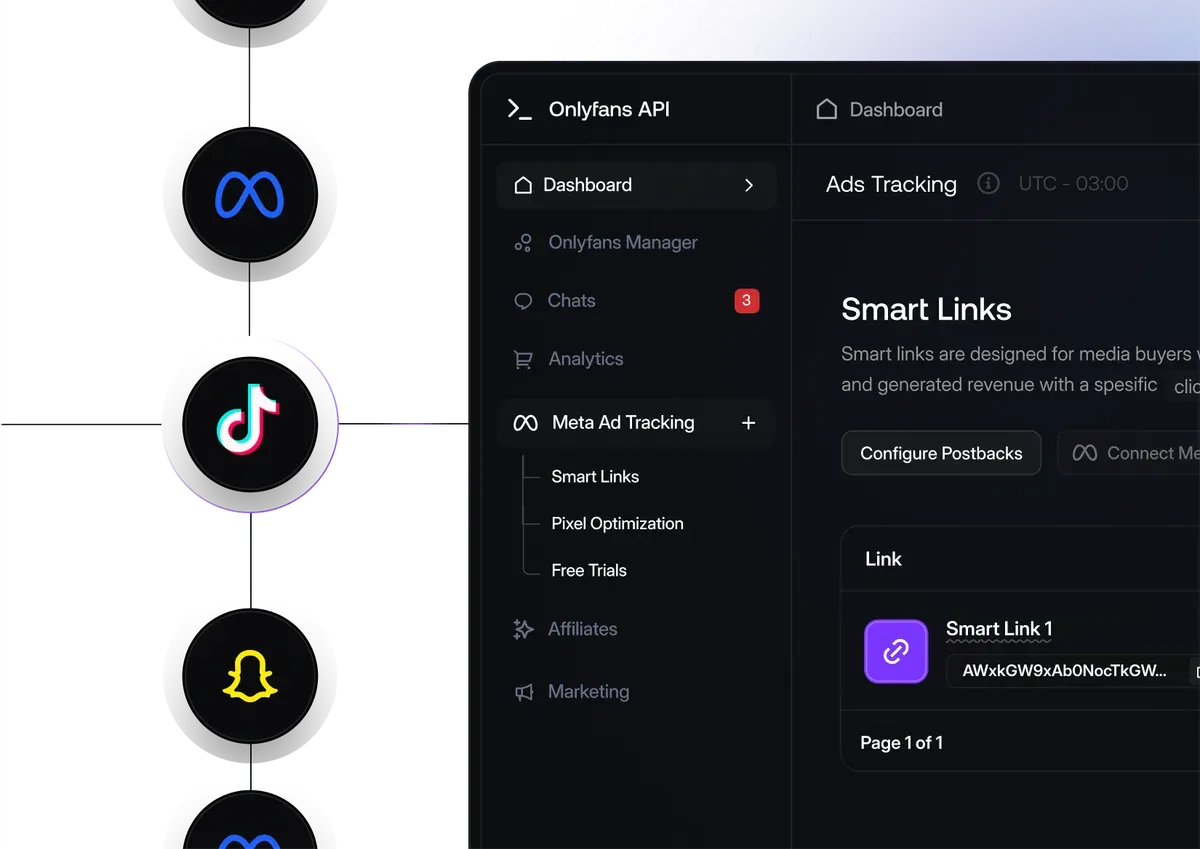
This is the actual Smart Links screen inside the Fans API dashboard. Every row represents one link, and the Configure Postbacks button is where you connect Meta, TikTok, Snapchat or an external tracker.
Is Smart Links safe to use?
Smart Links is designed to stay invisible to fans and separate from the creator’s profile. Tracking happens on the server, so nothing additional loads in the visitor’s browser and no script is added to the OnlyFans page. The fan clicks a link, arrives on the creator’s profile and subscribes normally.
Events reach advertising platforms through the integrations you configure, and reach trackers through standard postbacks. The creator’s account is connected through Fans API, the same connection its API and other add-ons use. We know of no independent security audit or certification for Smart Links, so judge it on the setup described here. Remember that tracking doesn’t change advertising rules, and your campaigns still have to follow Meta, TikTok and Snapchat policies on adult content.
Pricing
Smart Links costs $25 a month, billed once per team, on top of a Fans API account. Fans API offers a free plan, paid plans at $69 and $299 a month, and Enterprise pricing on request; see Fans API pricing for what each plan includes. The add-on price stays identical whether your agency spends $500 or $50,000 on advertising.
The following example uses invented numbers to show how the reports can change a decision. Imagine your agency spends $3,000 on Meta for one creator during a month and gets 150 subscribers. That equals a $20 cost per subscriber, which by itself tells you very little. Smart Links then attributes $4,200 in subscriptions, PPV and tips to those fans over the following 30 days.
| Example: one creator, one month | Creative A | Creative B | Total |
|---|---|---|---|
| Ad spend | $1,500 | $1,500 | $3,000 |
| Subscribers | 90 | 60 | 150 |
| Cost per subscriber | $16.67 | $25.00 | $20.00 |
| Revenue in 30 days | $1,800 | $2,400 | $4,200 |
| True ROAS | 1.2 | 1.6 | 1.4 |
Overall, the campaign returns 1.4 times its spending. Split by creative, the inexpensive subscribers from Creative A generate less revenue than the more expensive subscribers from Creative B. A cost-per-subscriber report alone would have moved more budget into the weaker advertisement. In this example, the $25 add-on represents less than 1% of the monthly ad spend. If your revenue figures are gross, remember that OnlyFans keeps 20%, so a True ROAS of 1.4 becomes roughly 1.12 after platform fees.
Who it’s for, and who should skip it
Smart Links is for agencies and creators who buy paid traffic and need to know which campaigns deliver subscribers who keep spending. It suits teams running Meta, TikTok or Snapchat advertising, media buyers who already use Keitaro or Everflow, and anyone comparing free trial offers against paid subscriptions. It becomes most useful once you operate several creatives or traffic sources simultaneously.
Skip it if you don’t buy traffic. If your subscribers come from organic social posts, the built-in OnlyFans links or the Data exports tool may cover what you need. Skip it as well if your creators sell on platforms other than OnlyFans or Fanvue. And if your advertising budget is very small, you may not collect enough subscriptions for the numbers to become reliable.
Pros and cons
Pros
- Attributes revenue after the first subscription, including PPV, tips and rebills
- Server-side tracking, so ad blockers and browser privacy settings don't break it
- Custom events, such as a fan reaching $1,000 in total spend, can feed your ad pixel
- Imports ad spend automatically and calculates True ROAS without a spreadsheet
- Flat $25 a month per team, whatever your advertising budget
Cons
- It's a paid add-on, so you also need a Fans API account
- Only OnlyFans and Fanvue creators are supported
- It measures traffic but doesn't generate any; you still have to buy and manage the ads
- Pixels and postbacks need configuring, and attribution needs traffic volume and several days before the numbers are reliable
Frequently Asked Questions
Short answers to the questions agencies ask most.
What is a Smart Link on OnlyFans?
A Smart Link is a tracked link you place in an advertisement or bio instead of the plain profile address. When a fan clicks and subscribes, Smart Links records which link delivered them, then keeps adding their later spending, such as PPV, tips and rebills, to that link. You can create a separate link for every creative, campaign or traffic source and compare their revenue directly.
How much does Smart Links cost?
Smart Links costs $25 a month, billed once per team rather than per creator. You also need a Fans API account. Fans API offers a free plan, paid plans at $69 and $299 a month, and Enterprise pricing on request. Check the current pricing page before you register, because the plan you need depends on how many creators and requests your agency handles.
Which ad platforms can receive events from Smart Links?
Smart Links can deliver events to Meta, TikTok and Snapchat, and it can fire postbacks to advertising trackers such as Keitaro and Everflow, so you can keep your existing tracker. You decide which events each destination receives. For example, you might send every new subscription to TikTok but send only high-spending fans to your Meta pixel, so the algorithm learns what a valuable subscriber looks like.
How long until conversion events appear in Meta?
Meta can take two to three days to display new events in Events Manager, so an empty first day does not necessarily mean the configuration is broken. Check Events Manager after several days before changing anything. After that, give your campaigns enough traffic to learn. Results depend on your offer, budget and conversion volume, so record a baseline first and compare performance as data accumulates.
Does Smart Links work with free trial links?
Yes. Free Trial Links and Tracking Links operate on the same tracking system as Smart Links. That means you can test a free trial offer with its acquisition cost attached, then see which trial cohorts eventually become paying subscribers. It is a practical way to check whether inexpensive trial subscriptions are valuable, or whether those fans disappear before they spend anything.
Is Smart Links the same as the built-in OnlyFans links?
No. The built-in OnlyFans campaign links count clicks and subscriptions inside OnlyFans, but they don't deliver events to your advertising platforms or import your ad spend. Smart Links adds server-side tracking, revenue after the first subscription, conversion events for Meta, TikTok and Snapchat, and True ROAS. If you only publish free promotional links on social media, the built-in links may be enough.
Verdict
Smart Links is worth the $25 if your agency spends real money on advertising for OnlyFans or Fanvue creators and needs to know which campaigns bring subscribers who keep paying. It does one job, measurement, and does not replace your ad account, your chatters or your CRM. If you don't buy traffic yet, wait until you do.
Best for: Media buyers who need to see which ad brought which paying fan