
Fans API · No-code automation
OnlyFans Make Integration with Fans API
TL;DR
- The OnlyFans Make integration is a Fans API app inside Make.com that turns OnlyFans data and events into visual, multi-step scenarios.
- Two ready-made blueprints sync your accounts and hourly revenue into Airtable, and you import them in a few clicks.
- Skip it if you want to self-host your automations, or if the app has no module for the action you need.
- Price
- Fans API plans: free, $69 or $299/mo
- Product
- Fans API
- Platforms
- Make.com scenarios; OnlyFans accounts connected to Fans API
- Free trial
- Fans API has a free plan with 100 welcome credits; Make.com needs its own account
What the OnlyFans Make integration is
The OnlyFans Make integration is a Fans API app for Make.com, the visual automation platform. It adds OnlyFans modules to Make’s scenario builder, so you can pull earnings, transactions and tracking links into other tools, or react to sales and messages, without writing code, and each scenario is a chain of modules you drag onto a canvas and connect.
Make suits workflows with several steps and some logic in the middle. A scenario can list your creator accounts, fetch each account’s numbers, check whether a row already exists, and then update it or create it. That branching is where Make differs from simpler trigger and action tools. The integration sits in our OnlyFans automation category, next to the OnlyFans Zapier integration and the OnlyFans n8n integration.
Key features
The Fans API docs list 25 modules for Make, plus two ready-made blueprints. These are the parts that matter when you plan a scenario.
Visual multi-step scenarios
Make shows each scenario as a row of circles, one per module, joined by lines. You can add a router to split the flow into branches and put a filter on each branch. The Fans API blueprints use this to search Airtable first, then send the data to “Update a Record” or “Create a Record” depending on the result. A clock on the first module sets the schedule, for example every 15 minutes or once a day.
Importable blueprints
A blueprint is a whole scenario saved as a JSON file. Fans API publishes two on its ready-made scenarios page. Account synchronization copies your OnlyFans accounts into Airtable and refreshes them once a day. Hourly account revenue data gives every account one Airtable record per day and updates it every hour. You import the file, add your own connections and set the schedule.
Instant triggers
Twelve modules are instant triggers, which Make runs the moment an event happens. Seven follow fans and sales: Chat Message PPV Purchased, Chat Message Received, Chat Message Sent, New Subscription, Subscription Renewed, Post Liked and User is Typing. Five watch the accounts themselves: New Account Connected, Account Connection Failed, Account Session Expired, Face OTP Required and OTP Code Required.
Data modules for reports
Three actions return totals for a period: Get Total Earnings, Get Profile Visitor Totals and Get Profile View Duration Totals. Nine searches return lists, such as List Accounts, List Transactions, List Tracking Links, List Tracking Link Subscribers, List Trial Links and [Payouts] List Earning Statistics. Search modules output one bundle per item, so the next module runs once for each account, transaction or link.
Custom API call
“Make a custom API call” can call any Fans API endpoint from inside a scenario. This is how you reach actions that have no dedicated module, such as messaging, and the docs also invite you to ask the team for a missing module.
Screenshot
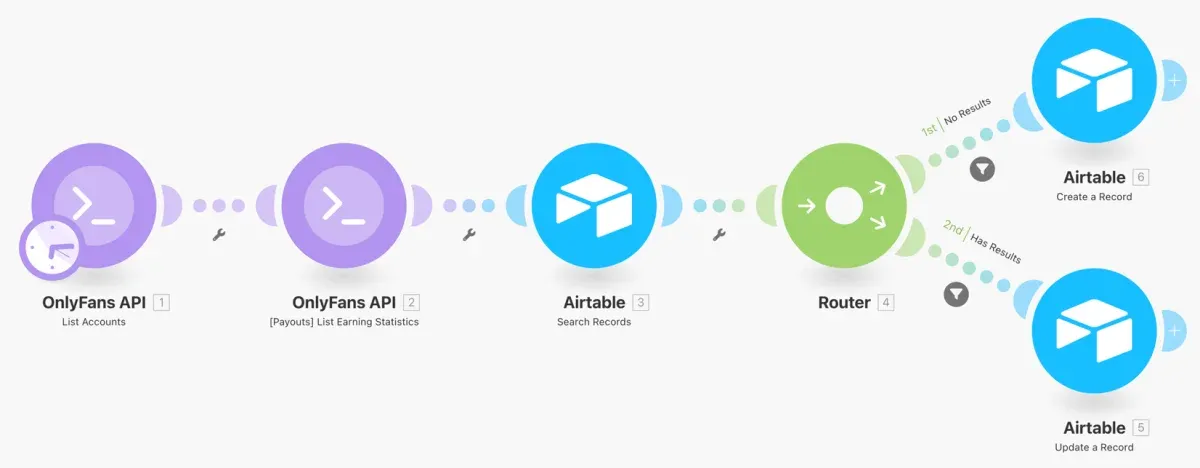
This is the hourly account revenue blueprint as it appears in Make after import. Two OnlyFans API modules fetch the accounts and their earning statistics. Airtable then searches for today’s record, and the router either creates a new record or updates the existing one.
Example workflow: hourly revenue into Airtable
This is the blueprint shown above, step by step:
- List Accounts runs on a schedule and returns every OnlyFans account connected to your Fans API team.
- [Payouts] List Earning Statistics runs once per account and returns its earnings, with net and gross amounts for tips, subscriptions, chat messages and posts.
- Airtable Search Records looks for the record that holds this account’s figures for the current day.
- Router splits the flow in two, with a “No Results” filter on one branch and a “Has Results” filter on the other.
- Airtable Create a Record adds today’s row when none exists yet.
- Airtable Update a Record overwrites today’s row with fresh totals when it already exists.
Set the schedule to hourly and you get one row per account per day, kept current through the day. From there Airtable can group the rows by week or month, or feed a dashboard.
Is the OnlyFans Make integration safe?
The integration connects through an API key, not through your OnlyFans password. You create the key in the Fans API console and paste it into a Make connection. Make never sees the creator’s login, which stays with the account connection in Fans API. Give each key a clear name in the console, so you know which scenario uses which key.
The real risks sit in your scenarios, because a scenario that copies transactions or chat messages into Airtable puts fan data in a second and a third place, so limit who can open those bases. Use the account triggers too: a scenario on Account Session Expired or OTP Code Required can post an alert to your team, so a broken login gets fixed before reports go stale. We know of no independent security audit for the Make app, so judge it on this setup.
Pricing
The Make app has no separate price. It comes with every Fans API plan, and each OnlyFans module that runs uses credits. Fans API has a free plan with one account and 100 welcome credits, Basic at $69 a month with 20,000 credits, Pro at $299 a month with five accounts and 100,000 credits, and Enterprise on request. See Fans API pricing for current terms. Make.com bills you separately on its own plans.
The credits documentation sets the rates that apply to scenarios:
| What runs in the scenario | Credit cost |
|---|---|
| Account-specific module (never cached) | 1 credit per request |
| Public, cached response | 0 credits |
| Instant trigger (webhook event) | 1 credit per 100 events |
| Extra credit pack | 25,000 credits for $50 |
Here is a worked example with invented volumes. An agency runs the hourly revenue blueprint for six creators. Each run makes one List Accounts call plus one earnings call per account, which adds up to seven requests. That is 7 × 24 × 30 = 5,040 credits a month at most, about a quarter of the Basic allowance. On the free plan, one account at two requests an hour would use the 100 welcome credits in about two days.
Instant triggers are much cheaper, since a New Subscription trigger firing 3,000 times a month costs only 30 credits. The real cost driver is how often scheduled scenarios run, so moving the same blueprint from hourly to daily cuts its credit use to one twenty-fourth.
Who it’s for, and who should skip it
The integration suits OnlyFans agencies that want their numbers in Airtable or a similar tool and have someone comfortable with flowcharts. Typical scenarios are daily account syncs, hourly revenue tables, tracking link reports per campaign, and alerts when an account needs a new OTP code. The blueprints make it a quick start for teams that have never used Make. Full setup steps are in the Make quickstart.
Skip it if you want to run automations on your own server, because Make is a hosted service. Skip it as well if your workflows are mostly about sending messages, since those need custom API calls in every scenario. If your team already lives in another automation tool, check the sibling pages above first. For real-time events in your own code, see OnlyFans webhooks.
Pros and cons
Pros
- Visual scenario builder with routers and filters, so one scenario can search, branch and then create or update a record
- Two importable blueprints for account sync and hourly revenue data
- 25 modules, including 12 instant triggers for sales, messages, subscriptions and login problems
- A "Make a custom API call" module reaches any Fans API endpoint the other modules don't cover
- Setup is one app install and one API key, with no code
Cons
- You need a separate Make.com account on top of Fans API
- The modules lean towards reading data; most actions, such as sending messages, need the custom API call module
- Both ready-made blueprints write to Airtable, so other destinations mean building the scenario yourself
- The pricing page lists webhooks on paid plans only, not on the free plan
Frequently Asked Questions
Short answers to the questions agencies ask most.
What do I need to set up the OnlyFans Make integration?
You need a Fans API account with at least one creator account connected, and a Make.com account. Install the Fans API app in Make from the invitation link in the docs. Then create an API key in the Fans API console, open a scenario, add an OnlyFans API module and save the key as a new connection. The whole setup takes a few minutes and needs no code.
What is a Make blueprint and how do I import one?
A blueprint is a scenario saved as a JSON file. Fans API offers two, one for account synchronization and one for hourly account revenue data. To import one, open the Scenario Builder, click the three dots on the toolbar, choose Import blueprint, select the .json file and click Save. Then add your own connections and set a schedule. Import into a new scenario, because unsaved changes in the open one are lost.
Which OnlyFans events can start a Make scenario?
The app has 12 instant triggers. Sales and fan activity triggers cover a chat message PPV purchase, messages received and sent, new and renewed subscriptions, a liked post and a fan typing. Account triggers fire when a new account connects, a connection fails, a session expires, or a Face OTP or OTP code is required. Instant triggers run as soon as the event happens, without waiting for a schedule.
Can a Make scenario send messages on OnlyFans?
Not with a dedicated module. The documented modules are triggers, three totals actions and nine list searches. To send a message or call any other endpoint, use the "Make a custom API call" module and pick the endpoint from the Fans API reference. It works, but you need to know which endpoint and fields to use. If an action matters to you, the docs say you can ask the Fans API team to add a module.
How many credits does a Make scenario use?
Make modules call the Fans API, so they use credits like any other request. The credits documentation charges 1 credit per uncached request and says account-specific endpoints are never cached. Instant triggers are webhooks, billed at 1 credit per 100 events. A scenario's cost is therefore roughly the number of OnlyFans modules it runs, multiplied by your accounts and by how often it runs.
Verdict
The Make integration fits agencies that want OnlyFans numbers flowing into Airtable or a similar tool, built by someone who thinks in flowcharts rather than code. The blueprints get you to a working revenue sync in minutes, and routers let a scenario update existing rows instead of piling up duplicates. It is weaker for actions such as messaging, where you fall back to raw API calls. If you want self-hosting or a long list of app connectors, look at the n8n or Zapier pages first.
Best for: Visual multi-step OnlyFans workflows without code