
FansCreator · AI content generation
Uncensored AI Image Editor for Creators
TL;DR
- FansCreator's uncensored AI image editor changes an image you upload or generated from one written instruction, and it doesn't refuse adult pictures.
- It shares the FansCreator plans, $29, $99 or $299 a month for 300, 1,500 or 5,000 credits, and full-resolution downloads start on the $99 plan.
- Skip it if you need to edit photos of people who haven't consented, or if you want pixel-level retouching with layers and masks.
- Price
- FansCreator plans: $29, $99 or $299/mo
- Product
- FansCreator
- Platforms
- Edits for OnlyFans (your own likeness only), Fanvue and MYM (AI models), plus Instagram, TikTok and X teasers
- Free trial
- Free plan with no card required; paid plans from $29 a month
What the uncensored AI image editor is
The uncensored AI image editor is a FansCreator tool that changes an image from a written instruction. You upload a picture or pick one you generated, describe the change in plain words, and get the edited image back. Mainstream AI editors refuse once the picture or prompt turns adult, while this one processes it like any other image.
FansCreator built it for creators and agencies who sell content, so it sits beside the generator in the same workspace. Generating gets you a picture, and editing gets you the picture you meant. It belongs to our AI content generation category with the image and video generators and face swap. FansCreator describes the product on its uncensored AI image editor page.
Key features of the uncensored AI image editor
Each feature below solves a problem creators hit when they try to fix adult images with general-purpose tools.
No refusal layer on adult content
Mainstream editors check the upload and the prompt before they edit. Even a swimwear shot can trip the filter, and the creator is locked out of a tool they pay for. FansCreator skips that check for adult content, so the edit renders instead of being blocked, blurred or quietly toned down.
Edit by a sentence, not by masks
You write what should change, and the model rebuilds that part of the image without any layers, lasso tools or masks. FansCreator’s own advice is to name the change, name what must stay, and change one thing at a time, for example “change the dress to a red silk slip, keep her face and hair the same”.
Fix one shot instead of regenerating it
When an image is almost right, you can fix the wrong detail and keep the rest. That beats rolling a fresh generation and hoping the face, light and pose land as well again. It also covers custom requests, where a subscriber wants the same picture with one thing different.
One image becomes a set
Subscribers buy sets rather than single pictures, so take the image that worked and prompt variations of it, such as a new outfit, a different room or evening light, for the feed, PPV messages and custom requests. Start from a still made with the NSFW AI image generator, or animate an edited result with the NSFW AI video generator.
Platform-ready downloads
The edited image downloads in formats for OnlyFans, Instagram, TikTok and X, which means the subscriber version and the social teaser come from the same edit. Per-platform formatting is listed from the Basic plan up, and you post every file yourself.
Product illustration: the edit step
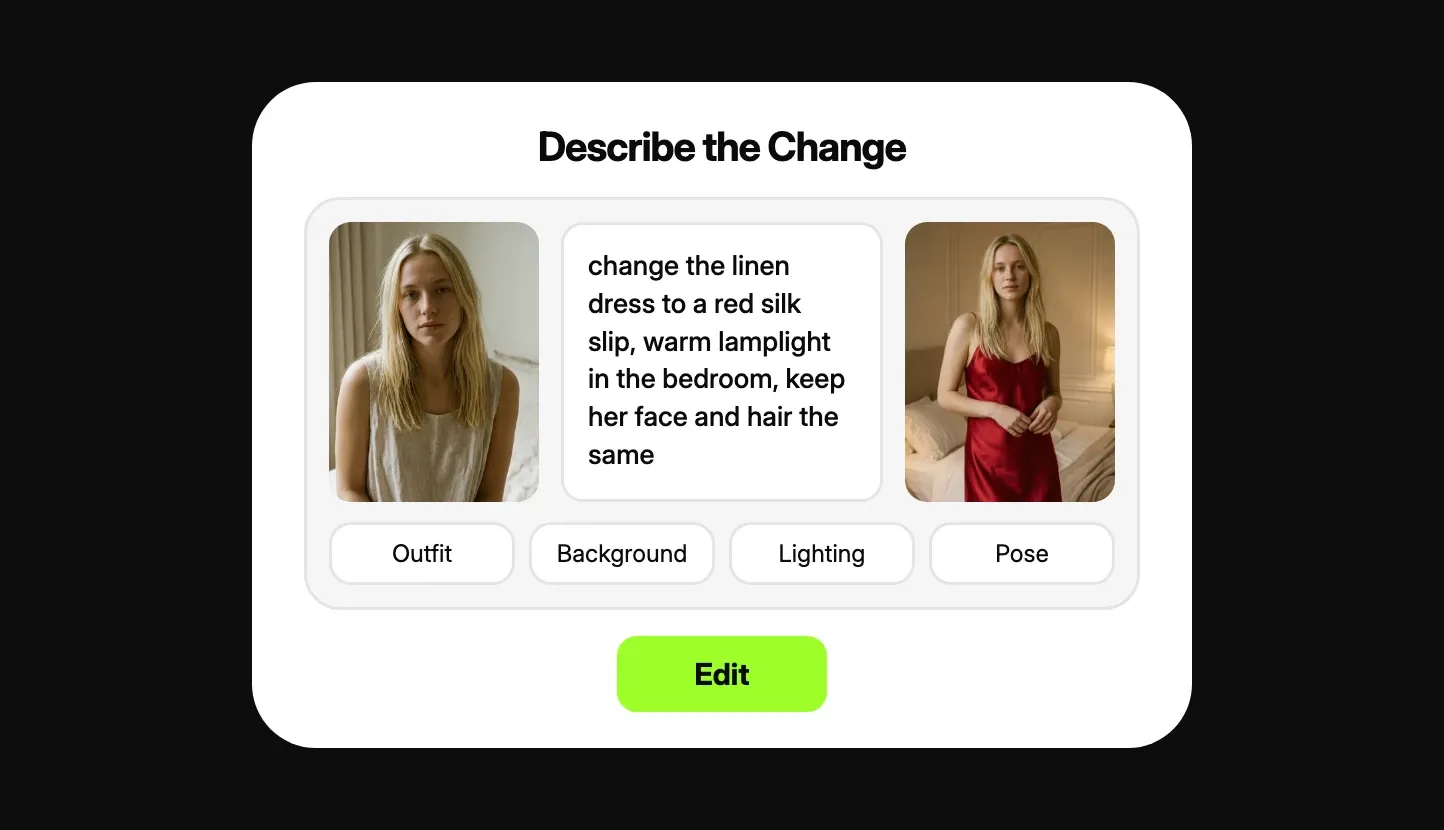
This is a marketing illustration from the FansCreator product page, not a screenshot of the live app. It shows the edit step as FansCreator presents it: the original image on the left, the written instruction in the middle and the result on the right. The prompt changes the outfit and the lighting and asks the editor to keep the face and hair the same. The buttons underneath suggest the four usual kinds of change: outfit, background, lighting and pose.
Is the uncensored AI image editor safe to use?
The uncensored AI image editor blocks the two kinds of edit with the most legal risk. You can’t edit a real person’s photo without their consent, and you can’t edit anyone underage or made to look so. FansCreator calls neither of these a grey area, and no setting turns them off. Inside those limits, editing your own photos or an original AI persona is legal in most places, but check the law where you work.
The bigger day-to-day risk is platform rules. OnlyFans only allows AI content that clearly features you, the verified creator, with an #ai or #AIGenerated label. It also lists heavily altered images as not allowed, so keep edits of yourself recognisable. Fanvue and MYM accept labelled AI models, while Fansly bans photoreal AI even when it is labelled. FansCreator quotes these clauses in its OnlyFans AI content policy guide. Nothing is posted to an account automatically, and we know of no independent security audit of FansCreator.
Pricing: what the plans give the editor
The editor shares FansCreator’s credit plans. Starter costs $29 a month for 300 credits, Basic costs $99 for 1,500 and Pro costs $299 for 5,000. Yearly billing costs ten times the monthly price, and there is a free plan plus a custom Enterprise tier. See FansCreator pricing for current terms.
FansCreator does not publish a fixed credit price for an edit. Its price list puts photo generation at 1 to 5 credits, depending on the model and resolution, and the app shows the exact cost before you confirm. So the table below works from what is published: the dollar value of a credit on each plan and top-up pack.
| Option | Price | Credits | Cost per credit | Full resolution |
|---|---|---|---|---|
| Starter plan, monthly | $29 | 300 | $0.097 | No |
| Basic plan, monthly | $99 | 1,500 | $0.066 | Yes |
| Pro plan, monthly | $299 | 5,000 | $0.060 | Yes |
| Top-up pack | $29 | 250 | $0.116 | Plan decides |
| Top-up pack | $79 | 750 | $0.105 | Plan decides |
| Top-up pack | $199 | 2,000 | $0.099 | Plan decides |
Here is how to use those numbers. Run five test edits, note the credit price the app shows for each one, and multiply it by the cost per credit on your plan. If an edit cost 2 credits, like a photo of a new AI avatar, it would be about 13 cents on Basic and about 23 cents from the smallest top-up. Plan credits renew each period and don’t roll over, but top-up credits never expire. That makes plan credits the cheaper source and top-ups the buffer for a busy month.
Who it’s for, and who should skip it
The uncensored AI image editor is for creators and agencies who already have images worth fixing. It suits OnlyFans creators who edit their own photos into new outfits and scenes, and agencies handling custom requests across accounts without a retoucher. It also suits AI persona builders who generate a model, then refine her images into a set for Fanvue or MYM. Agencies with several personas will want Basic or Pro, which allow 5 creators and unlimited creators, against 1 on Starter.
Skip it if your edits involve anyone who hasn’t given consent, because the tool blocks that and so does the law. Skip the Starter plan if you need sellable files, since it downloads low resolution only. If you need precise retouching of one small area, a classic editor with masks still does that better. To put a creator’s face onto existing images instead, the AI face swap tool is the better fit.
Pros and cons
Pros
- Adult images and prompts are edited instead of refused, blurred or quietly softened
- Edit by a sentence, with no layers, masks or selection tools to learn
- Works on uploads and on images generated in the same FansCreator workspace
- Turns one approved image into a set of variations without starting over
- Downloads come formatted for OnlyFans, Instagram, TikTok and X from the Basic plan up
Cons
- FansCreator doesn't publish a fixed credit price per edit, so you only see the cost in the app before you confirm
- The $29 Starter plan downloads low resolution only; full resolution starts at $99
- A prompt can change details you didn't ask it to change, so you must name what stays the same
- There are no manual masks or layers, so precise retouching of one small area still needs a classic editor
- OnlyFans removes heavily altered images, so edits of your own photos have to stay recognisably you
Frequently Asked Questions
Short answers to the questions agencies ask most.
What makes an AI image editor uncensored?
An uncensored AI image editor has no refusal layer on adult content between your picture and the edit. Mainstream editors screen both the upload and the prompt, and they reject or soften adult images before the edit starts. FansCreator processes those images like any other picture. It still blocks two things, real people without consent and anyone underage or made to look so.
Is the uncensored AI image editor free?
FansCreator has a free plan with no card required, meant for testing rather than running an account. Paid plans cost $29, $99 or $299 a month. Full-resolution downloads begin on the $99 Basic plan, so if you plan to sell edited images, budget for at least that tier.
How many credits does one edit cost?
FansCreator doesn't list a per-edit price on its pricing page. It lists photo generation at 1 to 5 credits depending on the model and resolution, and it says the exact price appears before you confirm each generation. Check that number in the app on a few test edits before you plan a month's budget.
Can I edit a photo of someone else?
Only with their consent. FansCreator lets you upload a photo of yourself or of a person whose consent you hold. Editing anyone else into adult content is prohibited by its terms and illegal in a growing number of countries. Any picture of a minor is blocked outright, with no setting to change that.
Can I post edited images on OnlyFans?
Edits of your own photos, yes, if they still clearly show you, the verified creator, and carry an AI label such as #ai or #AIGenerated. FansCreator's policy guide says OnlyFans lists wholly AI-generated content and heavily altered images as not allowed. Images of an original AI model belong on Fanvue or MYM instead, and Fansly does not allow photoreal AI.
Do I need editing experience or special prompts?
No. You describe the change in a sentence, such as a new outfit or a different room, and the editor rebuilds that part of the image. There are no layers or masks to learn and no workaround prompts to find. Writing what should stay the same, and changing one thing at a time, gets a usable result more often.
Verdict
The uncensored AI image editor is worth it if you already make AI images, or own photos you're allowed to edit, and mainstream editors keep refusing them. It is fastest at outfit, scene and lighting changes and at turning one good image into a set. Plan for the $99 Basic plan if you sell the output, and keep a classic editor for fine retouching.
Best for: Editing explicit images that mainstream editors refuse