
Fans API · No-code automation
OnlyFans Zapier Integration by Fans API
TL;DR
- The OnlyFans Zapier integration from Fans API sends OnlyFans events, such as a new subscriber, a PPV purchase or a failed account login, into the apps your agency already runs.
- It offers 13 instant triggers and no OnlyFans actions, so each Zap starts on OnlyFans and does its work in another app.
- Skip it if you need to send messages or pull earnings back from OnlyFans inside the workflow; Make, n8n or the API cover that.
- Price
- Fans API plans: free, $69 or $299/mo
- Product
- Fans API
- Platforms
- Zapier (web); OnlyFans accounts connected to Fans API
- Free trial
- Fans API has a free plan; Zapier needs its own account
What the OnlyFans Zapier integration is
The OnlyFans Zapier integration is a Fans API app inside Zapier. It turns events on your connected OnlyFans accounts into Zap triggers. A new subscriber, a PPV purchase or a failed login can start a Zap. That Zap then posts to Slack, adds a row to a sheet or updates your CRM, with no code involved.
The point is to reach the tools your team already uses. The Fans API docs pitch Zapier for its large library of app connections, and the app adds OnlyFans as one more source of events. You don’t move your agency into a new dashboard, because the events come to you. It belongs in our OnlyFans automation category next to Housekeeping, and it runs on the same account as the OnlyFans API.
Key features
The Zapier app is small on purpose: it listens to OnlyFans and passes each event to whatever app comes next in your Zap.
13 instant triggers
The docs list 13 instant triggers. Seven follow fan activity: Chat Message PPV Purchased, Chat Message Received, Chat Message Sent, New Subscriber, Subscription renewed, Post Liked and Fan is Typing. Six follow account health: Account Connected, Account Reconnected, Account Connection Failed, Account Session Expired, Account Requires Face Verification and Account Requires OTP (2FA) Code. The full list with example data is on the Zapier modules page.
Instant delivery
Every trigger is an instant trigger, which the docs describe as a webhook that runs the moment an event happens. Zapier doesn’t poll on a timer, so a sale or a login problem reaches your team as it happens. That matters most for alerts, where a late message is a useless message.
Account health alerts
Agencies lose money when a creator account drops its connection and nobody notices. Five triggers cover that: Connection Failed, Session Expired, Face Verification, OTP code and Reconnected. The face verification event includes a verification link in its data, so a Zap can pass it straight to whoever manages that creator.
Event data for other apps
Each trigger sends the event name, the account ID and the event details. A PPV purchase includes the fan’s name, username and the amount, like “$5.00”. A new subscriber includes the fan’s profile and the price, such as “free”. You map those fields into the next app with Zapier’s field picker.
API key connection
Setup takes one API key: you create it in the Fans API console, paste it into Zapier, and Zapier then shows your key name and team name under Account. The steps are in the Zapier quickstart.
Screenshot
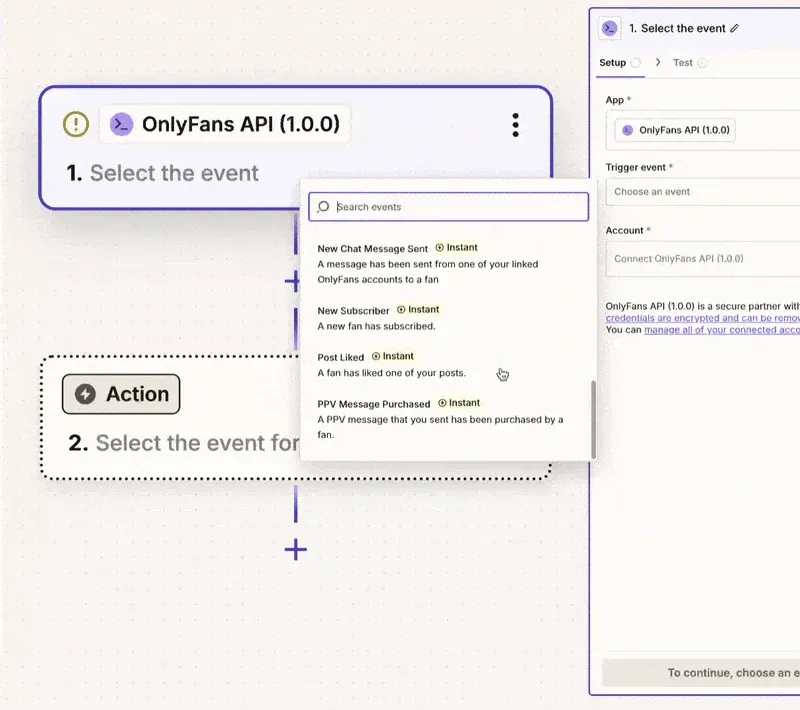
This frame comes from the Fans API docs. It shows the trigger picker in Zapier after you choose the OnlyFans API app. Each event carries an “Instant” badge, and the empty Action step below waits for the app you want to send the event to.
Example workflow: alert your team when an account needs attention
This Zap posts to a Slack channel whenever a creator account fails to reconnect on its own. It uses only the triggers the docs list. Slack is the example; any Zapier app with a “send message” action works the same way.
- Install the Fans API Zapier app from the invite link in the quickstart, then create a new Zap.
- Choose the OnlyFans API app as the trigger and select the event Account Connection Failed.
- Create an API key in the Fans API console under API Keys, then paste it into the Zapier connection window.
- Test the trigger. The sample data includes the event name,
accounts.authentication_failed, and theaccount_idof the creator account. - Add a Slack action that posts a message to your account managers’ channel, and map the account ID into the text.
- Turn the Zap on, then build a second Zap with Account Requires Face Verification as the trigger. Map its verification link into the Slack message so a manager can forward it to the creator.
Leave Account Session Expired out of the alert. The docs say Fans API reconnects those accounts by itself, so an alert would only add noise. A third Zap on Chat Message PPV Purchased that adds a row to a sheet gives you a running sales log with the same setup.
Is the OnlyFans Zapier integration safe?
The integration reads events through creator accounts that are already connected to Fans API. Zapier connects with a Fans API key, not with the creator’s OnlyFans login. Fans API says its logins use 2FA by SMS and face check, run through rotating proxies, and have had zero bans in five years. That is the company’s own claim, not an independent audit.
Two risks sit on your side. Anyone who holds the API key can read your team’s data, so give each key a clear name and delete keys you no longer use. Events also carry fan names, usernames and message text, so send them only to channels and sheets that the right people can see.
Pricing
The Zapier app costs nothing extra on the Fans API side. Fans API lists it with its plans: Free, $69 a month, $299 a month, and Enterprise on request. The pricing page lists the No Code Module on every plan and webhooks from the $69 plan up. Check Fans API pricing for current terms before you rely on the Free plan.
You also need a Zapier account, and Zapier bills that separately. Count both when you price it. If your team already pays for Zapier, the only new cost is the Fans API plan.
Who it’s for, and who should skip it
The OnlyFans Zapier integration suits agencies that already run their day in Zapier-connected apps. Account managers get Slack alerts for failed logins and 2FA codes. Sales leads get a sheet of PPV purchases and renewals. Ops staff get new subscribers in their CRM. It needs no developer, no server and no code at any point.
Skip it if your workflow must do something on OnlyFans, such as sending a welcome message or pulling earnings. The Zapier app has no actions, so the OnlyFans Make integration or the OnlyFans n8n integration fits better. Developers who want raw events can use OnlyFans webhooks directly.
Pros and cons
Pros
- 13 instant triggers that fire the moment an event happens, with no polling delay
- Plugs OnlyFans events into the apps Zapier already connects, such as Slack, Google Sheets, Airtable or a CRM
- Account health triggers warn your team about failed logins, 2FA codes and face verification
- Setup is a single API key pasted into Zapier, with no code and no server
- Runs on the Fans API account and connected creators you already have
Cons
- Triggers only; the documented Zapier app has no actions or searches that write to or read from OnlyFans
- You pay for a Zapier account on top of your Fans API plan
- Some payload fields arrive as HTML or text, such as message bodies and PPV amounts, so you may need a formatting step
- The app is installed through an invite link from the docs, which adds a step before it shows up in your Zaps
Frequently Asked Questions
Short answers to the questions agencies ask most.
What triggers does the OnlyFans Zapier integration have?
The Fans API docs list 13 instant triggers. Chat Message PPV Purchased, Chat Message Received, Chat Message Sent, New Subscriber, Subscription renewed, Post Liked and Fan is Typing cover fan activity. Account Connected, Account Reconnected, Account Connection Failed, Account Session Expired, Account Requires Face Verification and Account Requires OTP (2FA) Code cover the health of connected accounts.
Can a Zap send OnlyFans messages?
Not with the modules the documentation lists. The Zapier app has instant triggers only, so a Zap can react to OnlyFans events but can't post, send a message or pull earnings back. The Make app lists actions and searches, and the Fans API itself has messaging endpoints if a developer can call them. The docs invite you to ask for a module you need.
Do I need to know how to code?
No. You install the Fans API app in Zapier, create an API key in the Fans API console, and paste it into the Zapier connection window. Zapier then shows your key name and team name under Account. After that you pick a trigger and add actions from other apps with Zapier's normal editor.
How fast do the triggers fire?
All 13 are instant triggers, which the docs describe as webhooks that run immediately when an event happens. Zapier doesn't have to check for new data on a schedule. A new subscriber or a PPV purchase reaches your Zap as soon as Fans API receives the event from the connected account.
Should I use Zapier, Make or n8n?
Pick Zapier if you mostly want OnlyFans events to land in apps you already use, with the least setup. Pick Make if a workflow has many steps or must read earnings and transactions back from OnlyFans. Pick n8n if you want to self-host the automation. All three run on the same Fans API account and plans.
Verdict
The Zapier integration is the quickest way to get OnlyFans events in front of your team in the tools they already open every day. It works best for alerts and logging, such as posting a failed login to Slack or adding each PPV sale to a sheet. It can't reply to fans or fetch data from OnlyFans, because the app only has triggers. If your workflow needs to act on OnlyFans, look at Make or n8n instead.
Best for: Connecting OnlyFans to the apps an agency already uses