
Fans API · Analytics and tracking
OnlyFans Data Export with Fans API
TL;DR
- Data exports is the Fans API tool for an OnlyFans data export without code, turning transactions, fans, chat messages and payouts into CSV or Excel files.
- Most export types cost 1 credit per 20 rows, Public Profiles cost 3 credits per profile, and Smart Links exports are free.
- Skip it if your creators sell on Fansly, or if you need live numbers rather than files you download and import yourself.
- Price
- Fans API plans: free, $69 or $299/mo
- Product
- Fans API
- Platforms
- OnlyFans accounts; CSV, Excel (XLSX) and ZIP files
- Free trial
- Fans API has a free plan; exports are paid in credits (check Fans API pricing for which plans include exports)
What OnlyFans data exports are
Data exports is a Fans API feature that turns OnlyFans data into files you can open in a spreadsheet. You pick a data type, such as transactions or fans, choose the fields and accounts, set a date range and download the result as CSV or Excel without writing any code. An OnlyFans data export is the quickest way to get numbers out of the platform for accounting, payroll or your own reports.
Agencies usually hit the same wall. OnlyFans shows statistics account by account, inside its own screens, and gives you no easy way to combine ten creators into one table. Data exports pulls every connected account into a single file. It sits in our OnlyFans analytics category next to Smart Links, which measures ad traffic, and it runs on the same Fans API account as the OnlyFans API.
Key features
Data exports does one job: it moves OnlyFans records into files. These are the parts that matter when you plan reports around it.
Twelve export types
You can export Transactions, Chat Messages, Media, Trial Links, Tracking Links, Smart Links, Payouts, Chargebacks, Public Profiles, Fans, Followings and Profile Visitors. Most types need a connected creator account, while Chat Messages and Followings don’t, and Public Profiles are looked up by username without any connection at all.
Field, account and date filters
Each export type has its own list of fields, so a payroll file can carry only dates, accounts and amounts. You can export all connected accounts at once or pick specific ones, and set a date range where the type supports it. Smaller selections mean smaller files and fewer credits.
No-code setup in the dashboard
The dashboard flow is short enough that anyone on the team can run it. Click Create Export, choose the data type, the fields, the accounts and the date range, then review the cost. Finally click Export Data and choose whether you want the file as CSV or Excel. The full walkthrough is in the data exports documentation.
API control for automation
Developers can run the same exports through the API. One call creates the export and calculates its credit cost, a second call starts it, and status calls return the download link when the file is ready. A webhook event fires when an export completes, fails or is cancelled. Teams that want real-time events rather than files should read our OnlyFans webhooks page.
Media vault backups
A Media export packages a creator’s vault, meaning photos, videos and audio, into one ZIP file. Agencies use it for backups or before moving a creator to another setup, and DRM-protected videos are skipped and counted as failed downloads. Other files that fail are usually temporary problems, and running the export again often retrieves them.
Screenshot
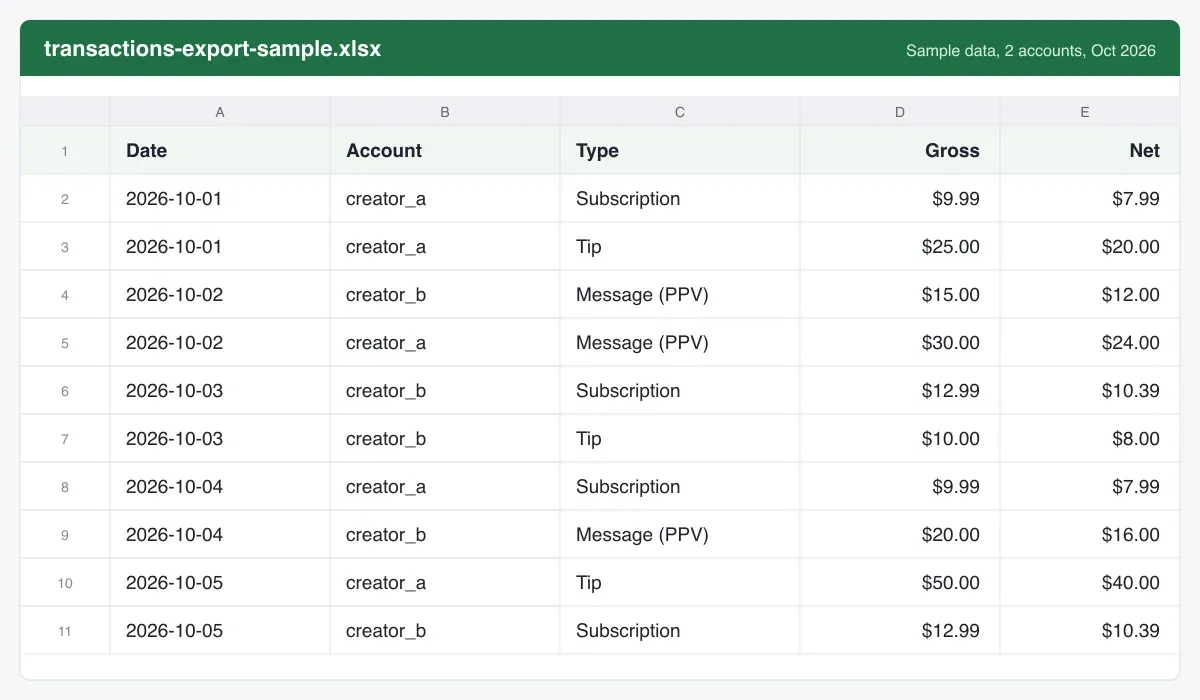
This image shows what a finished Transactions file looks like once you open it in a spreadsheet such as Excel or Google Sheets. The rows and column names are invented sample data, not a real account, because the real columns depend on the fields you select. Every row is one record, which makes the file easy to sort, filter and pivot.
Is it safe to export OnlyFans data?
Exporting is as safe as the place where you store the finished files afterwards. The export reads data through the creator account that is already connected to Fans API, the same connection the Fans API and its add-ons use. Nothing is posted to the creator’s profile, and fans don’t see that an export happened. The finished file is available through a download link in your dashboard or through the API.
The bigger risk sits with you. Transactions, Fans and Chat Messages files contain personal information about paying fans, so treat them like any customer data. Limit who can download them, avoid sharing them in open chat channels and delete copies you no longer need. We know of no independent security audit or certification for Data exports, so judge it on the setup described here.
Pricing
Data exports has no separate subscription, because every export is paid in credits from your Fans API account. Fans API offers a free plan, paid plans at $69 and $299 a month, and Enterprise pricing on request; see Fans API pricing for current terms. The credits documentation lists 20,000 credits a month on Basic and 100,000 on Pro, and sells extra packs from $50 for 25,000 credits.
The export price depends on the type:
| Export type | Cost |
|---|---|
| Transactions, Fans, Chat Messages, Payouts, Chargebacks | 1 credit / 20 rows |
| Media, Trial Links, Tracking Links, Followings, Profile Visitors | 1 credit / 20 rows |
| Public Profiles | 3 credits each |
| Smart Links | Free |
Here is a worked example with invented volumes. An agency with six creators exports October transactions for its accountant. That month has 18,000 transactions, so the file costs 900 credits. It also exports Profile Visitors for the same month: one row per account per day gives 6 × 31 = 186 rows, or about 10 credits. At the $50 pack rate of $0.002 per credit, the monthly OnlyFans data export for accounting costs under $2.
Chat Messages exports can grow much faster than transaction files. A team exporting 200,000 messages for chatter quality reviews spends 10,000 credits, about $20 at the same pack rate. The cost is based on matching rows found, so narrow the date range and accounts before you start. For some types the final cost is calculated after the export completes.
Who it’s for, and who should skip it
Data exports suits OnlyFans agencies that need their numbers in a spreadsheet and don’t want to write code to get them. A typical OnlyFans data export feeds monthly revenue reports across several creators, chatter commission and payroll sheets, chargeback reviews, vault backups and audience research on public profiles. It is also useful for checking Smart Links and tracking-link results against your own records.
Skip it if your creators sell on Fansly, because exports cover OnlyFans accounts only. Skip it as well if you want live dashboards, since every export is a file that you download and import yourself. In that case the API, webhooks or a no-code tool like the OnlyFans Zapier integration fit better. If you only need ad attribution, Smart Links already shows it.
Pros and cons
Pros
- Twelve export types, from transactions and payouts to fans, chats and profile visitors
- Runs from the dashboard with no code, or from the API when you want to automate it
- You pick the fields, the accounts and the date range, so files stay small and relevant
- The cost is shown before you start, based on the number of matching rows
- CSV and Excel output opens in any spreadsheet and imports into most databases
Cons
- OnlyFans accounts only; Fansly media has to be fetched another way
- Files are downloads, not a live sync, so a sheet or warehouse needs a separate import step
- Large exports can take several hours to finish
- DRM-protected videos are left out of media exports
Frequently Asked Questions
Short answers to the questions agencies ask most.
What data can I export from OnlyFans with Fans API?
Fans API lists twelve export types. They are Transactions, Chat Messages, Media, Trial Links, Tracking Links, Smart Links, Payouts, Chargebacks, Public Profiles, Fans, Followings and Profile Visitors. Most need a connected creator account. Chat Messages and Followings don't, and Public Profiles are looked up by username without any connected account. Each type has its own list of fields you can include or leave out.
Which file formats does an OnlyFans data export use?
Most export types download as CSV or as an Excel XLSX file. You choose the format when you click Export Data at the end of the setup. Media exports are the exception. They are packaged as a single ZIP file containing the photos, videos and audio from the creator's vault, apart from DRM-protected videos, which the export skips.
How long does an export take?
Small exports usually finish quickly, but large ones can take several hours, especially media exports from a big vault. You don't need to keep the browser open. Close the tab and return later to download the file. If you start exports through the API, you can check their status or listen for a webhook that fires when an export completes.
Can I send exports straight to Google Sheets or a data warehouse?
The documentation describes downloading the finished file, not sending it to a destination automatically. To get the data into Google Sheets, Excel online or a warehouse, import the CSV yourself. If you want a hands-off pipeline, start exports through the API and use the completed-export webhook to trigger your own import job.
Do exports work for Fansly accounts?
No. The Fans API documentation says data exports currently cover OnlyFans accounts only. For Fansly, the media guide suggests paging through the account media endpoint and downloading each file individually. That works but takes more effort, and it requires code. Check the documentation again before you plan around it, because supported platforms can change.
Verdict
Data exports is worth using when your agency needs OnlyFans numbers outside OnlyFans, for accounting, payroll, a backup or your own reports, and nobody on the team writes code. It produces files, not dashboards, so pair it with a spreadsheet or a BI tool. For most monthly reports the credit cost is small. If you need data the moment it changes, use the API and webhooks instead.
Best for: Getting OnlyFans data into spreadsheets without code